The person who ends up holding the list
It usually happens quietly. A parent’s tablets multiply from two to seven. There is a cardiologist, a GP, a physiotherapist and a hospital letter from last spring. One day you realise that you are the person who knows what Mum takes, and that “knowing” means a shopping list on your phone, a photographed box in your gallery and a vague sense of which tablet was stopped.
Then comes the call from the clinic, or the emergency department, or the pharmacist: what is she taking, exactly, and since when? The answer you can give in that moment is only as good as whatever you happened to write down.
An elderly parent medication tracker is not about perfection. It is about having one dated place where the facts live, so you are not rebuilding them under pressure.
Why does a voice and photo record beat memory for a caregiver?
Caregiving is a long series of small interruptions. You visit, you notice something, you hear about a new tablet, you take a call from a nurse. Nothing in that rhythm leaves room for a formal log, which is why most are abandoned.
Two features suit this well. Speaking takes a few seconds and needs no typing, so you can log in the car park or at the bedside. Photographing captures what you cannot easily retype: a prescription label, a hospital letter, a printed medication schedule. You can pick every page of a document at once, and Sayved saves them as a single entry with readable text. The original photos stay on the phone.
How do I set up a care log for a parent in two minutes?
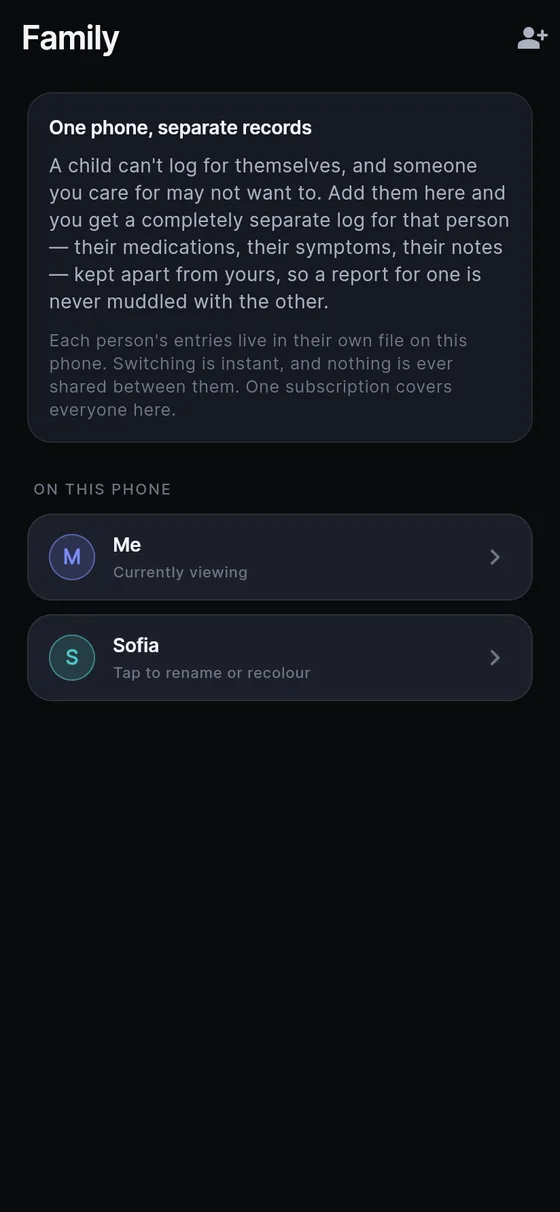
- Create their profile. Settings → Family → Add someone. It asks for a name and nothing else: no date of birth, no relationship. Their entries go into a separate log file on your phone. Nothing can leak between profiles, which matters when you also log your own health.
- Always check whose log is open. While a profile other than yours is active, the name shows in the app bar. Switch from there before you log or ask anything.
- Photograph what already exists. Start with the current prescription, the pharmacy printout and the most recent clinic letter. These are the base layer of the record.
- Create a condition for each thing worth following, if you want one: Settings → Conditions → New condition, in your words, such as “Dad’s heart” or “Mum’s blood pressure”. It is simply a folder you name. The app never suggests one or claims your parent has it, and it never points at what might be causing anything.
- Routines for the daily doses. Log a morning dose once, open it and choose “Add to daily routine”. From then on, one tap files it, already complete, and hold the tick to log a different amount this once. A routine never files anything on its own, so each entry still means you or your parent confirmed it. Routines for symptoms are not possible; only actions can repeat.
- Reminders are optional. Settings → Reminders are per profile, off by default, use your wording and go quiet if you have already logged. Avoid putting a condition or tablet name in the wording on a phone others can see.
What can I say to log a day of care?
Short, plain sentences are enough:
- “Mum took the morning tablets at eight, all four.”
- “New prescription from the GP, amlodipine five milligrams once a day, replaces the old one.”
- “Dad’s blood pressure one forty over ninety, after sitting for ten minutes.”
- “She was dizzy on standing, about a 4 out of 10, sat down for a while.”
- “Appointment at the memory clinic, they want repeat blood tests in March.”
Blood pressure readings and similar numbers are stored as you say them. Ratings use one 0–10 scale where the number is how much of the named thing there is. For documents, say “scan a document” and select every page; they are saved together as one entry.
What should I ask the log before the next appointment?
Ask answers from your parent’s entries only, and states which profile it used. It answers when you ask, never on its own, and does not offer opinions. After a few weeks, try:
- “What is my father currently taking, according to my entries?”
- “When did the GP last change a tablet?”
- “How many times did I log dizziness since the last appointment?”
- “List all blood pressure readings from this month.”
- “What did the discharge letter say about follow-up?”
Check the profile name at the top of every answer before you repeat it to a clinician. If the log is thin, the answer includes a caveat, and it can only reflect what has been recorded.
How do I bring the record to the doctor or pharmacist?
Go to Settings → Doctor report. Switch to your parent’s profile first, since the report covers the active person. Choose a period of one month, three months, six months, a year or everything. If you made a condition, pick it to show only what is tagged to it. Keep “Include health, medication and mood” on, since that is typically the point.
The result is a day-by-day document you can print, save as a PDF or send ahead. It reports what was logged and keeps estimates as ranges. It does not summarise or judge. For a visit checklist beyond the report itself, see what to tell your doctor.
What this does not do
Sayved is a personal record, not medical advice and not a medical device. It does not check doses, interactions or whether a tablet was taken, and it will never say that a day was missed. Sudden confusion, a fall, chest pain or difficulty breathing are matters for a doctor or emergency services, not for logging first.
If your parent is the one using the phone, keep in mind that the log lives only on that device. Use Settings → Export now and then to keep a copy.
Reading your voice and photos, and Ask, are part of Sayved Pro: 14 days free, then $2.99 per month, covering every profile on the phone. What is already logged stays readable, searchable and exportable afterwards at no cost. See the family health tracker and document scanning pages for more.
 Sayved