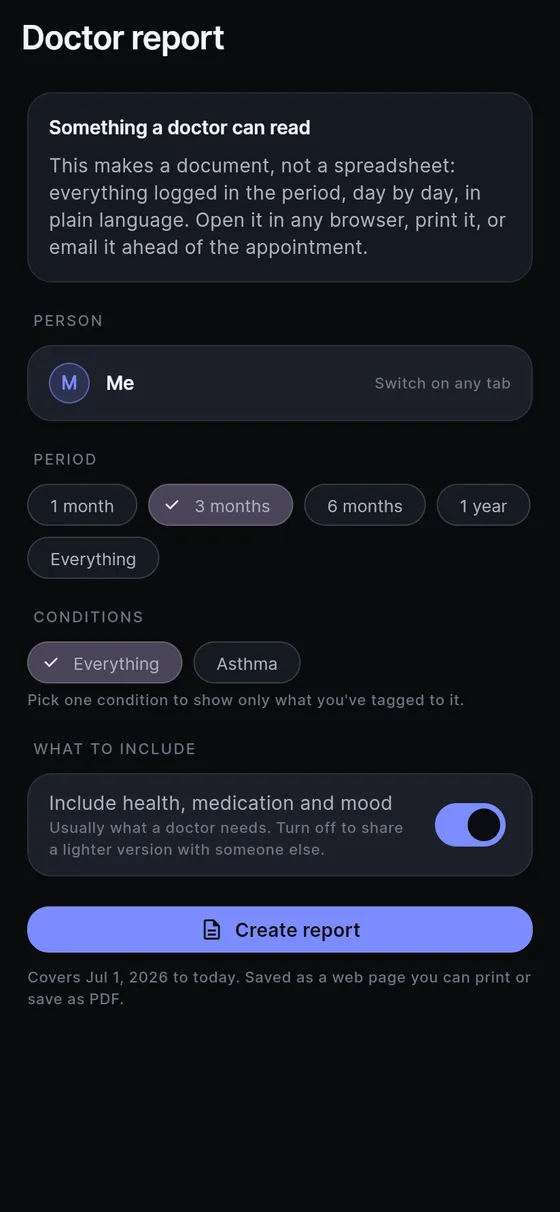
Ten minutes is a short time to describe three months. A doctor visit usually starts with “so, how has it been since I last saw you?”, and most of us answer from a memory that smooths everything into “on and off”. The Doctor report in Sayved replaces that with a page: dates, doses, ratings, in order, in your own words.
What is a health report for a doctor in Sayved?
It is a chronological document built from your log, grouped by day, written to be read quickly across a desk. Each line is one entry: when it happened, what category it is, the values you or the app recorded, and your own wording where you gave it. Fields appear in a fixed order, so two reports read the same way and a clinician learns where to look.
It is deliberately not a spreadsheet. Sayved also has a whole-database CSV export for that, covered on the export health data page. The Doctor report is the other thing: the readable one.
How do I make a symptom summary for my doctor?
Go to Settings, then Doctor report. You choose three things.
Who it is for. If you keep profiles for family members, pick the person. The report is built from that person’s log only, because each profile is its own separate file on the phone.
What it covers. Pick a condition you have created in Sayved, or choose everything. If you created “eczema” and tagged entries to it, the report can show only those, which keeps it short enough to be read. A report limited to one condition is the main reason conditions exist. See the condition tracker. You can also leave the filter off for a general “here is everything” report.
How far back. The options are measured in months, because clinicians think in appointments rather than weeks: one month, three, six, twelve, or all time. Three months is the default.
Then Sayved builds the document and opens your phone’s share sheet. Email it to the clinic, save it to your phone, or print it.
What does the report actually contain?
At the top, the person’s name, the period, and the date it was generated, followed by a plain note: this is a self-reported log kept by the person named, entries are their own words, nutrition and energy figures are estimates from a description or photograph and not measurements, and nothing in it is a diagnosis. That note is there because a document going to a doctor is the worst place to let a number pass as something it is not.
Below that, entries run day by day. Estimates keep their ranges, so a meal appears with a low and high bound rather than a bare calorie figure. If you filtered to a condition, each line can show which conditions it belongs to. If a line came from an automatic source rather than something you recorded, it is marked “not self-reported”.
If you turned on the optional energy baseline, a single note explains it as a calculation from body measurements and not something you logged, and it is never added into any entry’s figures.
What goes in a printable medication list?
Medication entries are part of the report, with the name, the dose if you said one, and the time, for the period you chose. That makes a printable medication history for the visit: not a prescription record, but what you actually took, including the days you did not. If you only want that, you can build a report that covers a short window, or keep the sensitive switch on and let the rest stand beside it. The medication log page explains how doses get captured.
Because it records, and does not judge, “missed” never appears. A day without a medication entry is just a day without an entry.
What should I bring to an appointment?
A short list that works with the report:
- The report for the condition being discussed, generated the day before so it is current.
- A list of questions, written down while you remember them.
- Anything that was handed to you since last time, such as lab letters. A multi-page document photographed in Sayved is stored as one entry, which helps you find it again.
- For a child or older relative, the report from their profile, not yours.
The before a doctor appointment guide goes through a full routine, including what to log in the days beforehand.
Is it private to share?
The report is built on your phone from your stored entries, and building it needs no AI model. What you do with the file afterwards is up to you, so treat it as the sensitive document it is. The sensitive-categories switch exists for this: if you are showing the document to someone other than a clinician, you can leave out the private categories before it is made. The privacy page covers the rest.
What it costs
Making and sharing a report is not locked behind the subscription. Capturing entries by voice, photo and document is part of Sayved Pro: 14 days free, then $2.99 a month, and what you have logged stays yours, free, forever. See pricing. Sayved is a record-keeper, not a clinician: read the medical disclaimer.
 Sayved