The situation: ten minutes and a blank head
You booked this appointment three weeks ago. Since then something has come and gone: a knee that stiffens, headaches on some mornings, a stomach that is unpredictable. When the doctor asks “and when did this start?”, you hear yourself say “a few weeks, maybe a month?” Then comes “what are you taking for it?” and you remember the tablet but not the dose, or the day you stopped.
None of this is a failing. Memory is a poor instrument for dates and amounts, and appointments are short. What helps is simple: write things down when they happen, in whatever words come naturally. Sayved is built for exactly that, because writing things down is the part people stop doing.
How do I prepare for a doctor visit with Sayved?
Set it up once, then forget it exists until you need it.
The two-minute setup
- Install Sayved and open it. There is no account to create.
- If the visit is about someone else, such as a child or a parent, add them under Settings, then Family. Each person gets a completely separate log, so a report for one is never muddled with another.
- If the matter is long-running, go to Settings, then Conditions, and create it using your own word: “knee”, “headaches”, “reflux”. The app never suggests a condition and never names one for you. You choose the label, and it simply groups entries together.
- Optional: switch on reminders if you want a gentle nudge. They are off by default, use your wording and times, and stay silent if you have already logged.
That is all. From then on, your only job is to say what happens.
What should I say? Example sentences
Press and hold the round button and speak. You never choose a category, and one sentence can become several entries. Here are things people actually say:
- “Headache behind the left eye since about two, a 6 out of 10.”
- “Took a paracetamol at three, headache down to a 3 by four.”
- “Slept badly, woke up four times.”
- “Knee clicking on the stairs again, not painful, more annoying.”
- “Dizzy when I stood up from the sofa, lasted a few seconds.”
- “Started the new tablets from the pharmacy today, one with breakfast.”
Words are fine. If you say “pretty bad”, the app converts it to a number on its 0 to 10 scale and shows you what it did (“Read from ‘pretty bad’”). A number you state yourself always wins over the adjective next to it. Pain 10 means the worst pain; the number says how much of the named thing there was, never whether the day was good or bad.
If you are somewhere you cannot speak, type the same sentence. Typed text is treated exactly like speech. If you have a prescription leaflet or a printed test result, photograph it, and a multi-page document is saved as one entry with readable text. See scanning medical documents.
What can I ask my log before the appointment?
Open the Ask tab and write the question as you would ask a person. The answer comes only from your own entries, and only the rows needed to answer are used.
- “When did I first mention the knee?”
- “What painkillers did I take in the last two weeks, and how often?”
- “On the days I logged a headache, what did I log the night before?”
- “How many mornings did I rate the stiffness above 5?”
The last two are questions you chose to ask. Sayved never volunteers patterns or tells you what it thinks is behind them, because a coincidence in a short log is easy to mistake for a cause. You get your own entries back, with dates, and you and your doctor decide what they mean. More on this in asking your health history.
How do I set up the doctor report?
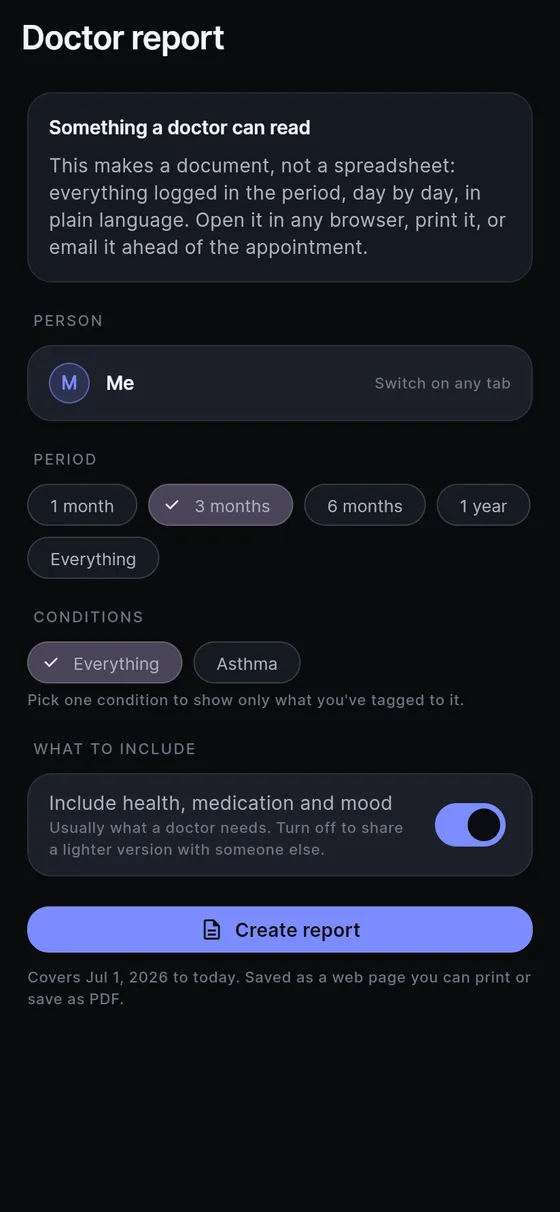
Open Settings, then Doctor report. You make four choices:
- Person. Whose log this is, if you keep more than one.
- What to include. Everything, or a single condition you created, which gives a shorter document focused on that one matter.
- Period. One month, three months, six months, a year or everything. Pick roughly the time since you last saw this doctor.
- Include health, medication and mood. On by default, because it is usually exactly what a doctor needs. Switch it off for a lighter version.
Then tap Create report. You get a readable document, day by day, in plain language, saved as a web page that you can print, save as PDF, or send ahead of the visit. Estimates keep their ranges, and any line the app added without you saying it is marked “not self-reported”. The full walkthrough is in the doctor visit report.
A tip from the setup side: make the report the day before, not the morning of. If something looks wrong, such as a misheard dose, you have time to open the entry and fix it. Your correction is stored beside the original reading, and nothing is lost.
What does it not do?
It does not know your history before you started logging, and it cannot tell your doctor anything you did not tell it. It does not give advice about your health, and it will never say a number is “good” or “bad”. The date and amount of a medicine are what you said, so if you misspoke, correct the entry.
Where your words go: your log lives on your phone. To read a spoken sentence or a photo, the text or a downscaled copy is sent to an AI model with no name, email or account attached, and nothing is kept on our servers. Spoken audio is transcribed on the phone and never uploaded.
Sayved is 14 days free, then $2.99 a month. Whatever you logged stays readable, searchable and exportable for free, forever. For the full picture, see pricing, and for how the app treats your data, privacy.
Bringing it into the room
Hand over the page, say “this is what I wrote down”, and let the doctor read it. You can still talk it through; you are just not the only memory in the room. If you want a deeper look at keeping a symptom record at all, read about the symptom diary and the medication log.
Sayved is a personal record, not medical advice. It cannot say what is wrong, and nothing in it replaces a clinician. If something feels urgent, do not wait for the appointment. Contact a medical professional or your local emergency number.
 Sayved