Why does a quiet day read as zero calories burned?
If a calorie log only counts what you enter, a day with nothing logged shows zero burned. That is not a gap in the record, it is a wrong number in it. A living body spends energy whether or not you opened an app. The days this misleads most are the ones worth reading: a day you chose not to eat, where the real story is how much was spent.
Sayved’s energy baseline fixes this without pretending to know more than it does. It adds a calculated daily figure to the burned side, labelled as calculated, so a fasting day reads as a day with nothing eaten and the baseline spent, rather than “nothing happened”.
How does the energy baseline work?
You set it up once in Settings under Energy baseline. You enter height, weight and age, choose a sex, and pick the description that matches your day without exercise. The four choices are desk job and mostly sitting, on my feet some of the day, on my feet most of the day, and physically demanding job.
From those, Sayved suggests a daily figure using the Mifflin-St Jeor equation, shows a range around it, and invites you to keep it or type your own. If you have a measured figure from a clinic, enter that and it is recorded as stated rather than estimated. The calculator suggests and you confirm, and the difference between the formula and your number is kept as your own correction, even when your weight later changes.
A toggle, Count the baseline, decides whether the figure joins your totals. It is off by default and never prompted for. The first time you switch it on, it counts from that day. It is never applied to past days you did not opt into.
What is the difference between BMR and a baseline in a calorie tracker?
BMR is the energy a body uses at rest. Many trackers multiply it by an activity factor labelled with exercise, such as “moderately active, exercise 3-5 days a week”. That factor already contains your workouts, so adding a logged run on top counts it twice. A 500 kcal run double-counted on an 1,800 kcal base overstates the day by more than a quarter.
Sayved avoids this by keeping the two apart. Its activity choices describe only what your job and daily life do, and they are deliberately lower than the familiar ladder. The app says it directly: anything you log as exercise is added on top, so counting it in the baseline would count it twice. The word “baseline” is also on purpose. It means the floor your day starts from, with no fitness-forum vocabulary needed.
For children and teenagers, the adult formula materially underestimates. Under 18, Sayved uses the WHO/FAO Schofield equations, banded by age, and says so on the screen. Every saved set of measurements is kept as a dated row and never rewritten, so a growing child’s list of saved measurements doubles as a growth record.
Where can I see my net calories for the week?
The baseline appears in four places, each labelled as calculated:
- Today and Home. Burned includes the baseline, with a footnote such as “includes 1,750 baseline” so a jump in the figure is never unexplained. On Today, a Not today action drops the baseline for that one day, and Add back restores it. Nothing is deleted either way.
- History. Under each day that has entries, a read-only line reads “Baseline burn 1,750 kcal, calculated, not an entry”.
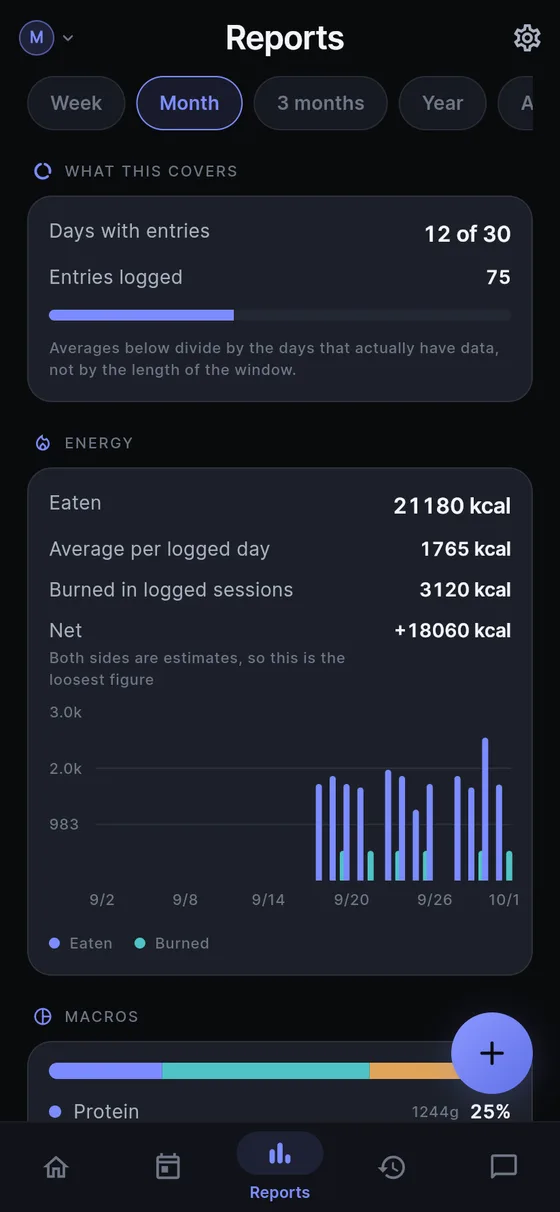
- Reports. The Energy card lists eaten, burned in sessions, the calculated baseline and Net over the whole window, with a daily chart of eaten against total burned. Pick a week, month, three months or a year. A fasting week with nothing logged reads as a deficit instead of the card disappearing.
- Doctor report. A short note states that the baseline is a calculation from the body measurements, not something measured.
The Net line carries its own caution: both sides are estimates, so it is the loosest figure on the screen. See health charts and reports for the rest of the Reports screen.
Can I use this for fasting?
Yes, and it is the case the feature was designed for. On a day you fast on purpose you log nothing, and the baseline and any exercise you do log still show as spending. If you do eat, the food side fills in as usual. Nothing in the app labels a fasting day as good or bad. The fasting log page shows how this fits a fasting routine.
If you prefer to treat a day as out of scope, such as a day of illness, Not today removes the baseline from that one day.
What does Sayved deliberately not do?
The rules are fixed, and they matter more than any feature:
- No target, no goal weight and no “to change by this much you need this many calories”. The app reports the number and stops.
- No colour on the net figure. A deficit is not green and a surplus is not red.
- No notification, ever, about the baseline or a gap.
- No streaks and no “logged 5 of 7 days” on Home.
- No prompt to set it up. It lives in Settings and nowhere else.
- It follows the weight you log, as of each day, so a number for April does not move because the scale said something different in September.
Questions about how much energy you need belong with a doctor or dietitian. Sayved is the record you bring to that conversation. The food side of the picture is in the food diary, and the exercise side in the workout log.
 Sayved