What is a life log app?
Lifelogging is an old idea: write down what happens, so the things you would otherwise forget are still there when you need them. The usual obstacle is effort. A journal wants a blank page, a spreadsheet wants columns, and an app with forty categories wants you to pick one before you can save anything. Most of those habits end within a month.
Sayved is built around the opposite promise. You say it or snap it, and it is written down. You never choose a category. The sentence is read, sorted and stored, and you can look it up later or ask about it. The capture is meant to take under ten seconds, and a long-press on the floating button records immediately.
It began as a place for meals, medication and symptoms, but the product is the capture method and the retrieval, not the subject. Food, exercise and supplements were simply the first categories. If you want to keep a record of something else, it works.
What can I say to a life log?
Anything that happened, in your own words:
- “Picked up Dad’s prescription and dropped it off, took about an hour.”
- “The boiler guy came, replaced the pressure valve, he said it should last years.”
- “Ran into Marcin at the station, he’s moving to Berlin in March.”
- “Heat was brutal today, thirty-eight outside, stayed in till five.”
- “Finished the book, started the next one.”
- “Photo of the receipt for the laptop repair.”
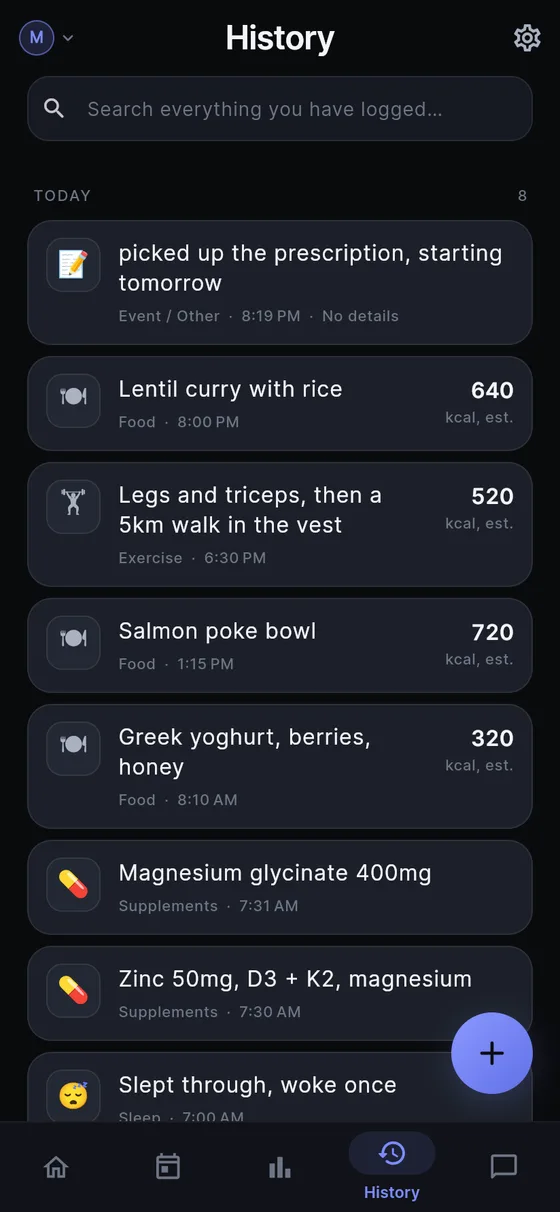
Some of these land in a specific category. The heat note can be filed as an environment entry (sun, heat, cold, altitude, air quality or screen time). Meeting Marcin can be a social entry, with who was involved kept as the names you used. A receipt or a document can be photographed and saved as a readable entry; pick every page at once and they are saved as one. The boiler visit and the finished book have no obvious home, so they go to Event / Other.
One sentence can also become several entries. “Took 50 mg zinc and did legs for an hour, then had a long chat with my sister” is a supplement, an exercise and a social entry. You say it once.
Is there really nothing Sayved will refuse to log?
That is the design rule, and it is why the catch-all exists. If a person has something to log and there is no category for it, the product has failed at being universal. Event / Other guarantees that every utterance has a home. Capture is also never blocked by a question: if Sayved is not sure, it saves the entry with low confidence and lets you correct it later.
The same reasoning is why more categories exist from the start. A category that does not exist yet does not degrade gracefully, because everything that would have belonged to it lands in Other and stays there. Sayved has 14: food, exercise (including added load), supplements, medication, health, body, mood and energy, intimacy, sleep, stimulants, substances, environment, social and other. All are inferred. The point is to keep the record consistent, not to make you file it.
The app does not comment on what you log. A summary is one neutral line, with no praise and no concern, and there are no streaks, goals or red and green days.
What does an “other” entry store, and how do I find it again?
An Event / Other entry has a short neutral summary, the time (as you said it and as resolved), the free-text notes for anything that has no field of its own, and photos if you added them. A number you mention can be kept as a measurement with a unit. That is deliberately all. It is a plain record, and every field can be edited, with your correction stored separately from the original reading.
To find it again you have three options. History lists everything, newest first, and search matches words in summaries and notes. Ask takes a plain question, “when did the boiler last get serviced?” or “what did the garage say about the brake pads?”, and answers only from your own entries, citing the ones it used. Only the rows needed to answer are sent, never your whole history, and Sayved never volunteers a connection you did not ask about. The third is export: a CSV of everything, whenever you like. See ask your history and exporting your data.
An honest limit: because Other has no dedicated fields, a long run of free-text entries is searchable and askable but not chartable. If you find yourself logging the same thing every day, it often deserves a category, and you can read how it works for how entries are classified.
How private is a life log, and what does it cost?
Your log lives on your phone, and each person in a household has their own separate log file. Voice is transcribed on-device and audio is never uploaded. To read a sentence or a downscaled photo, a copy goes to an AI model with no name, email or account, and nothing is kept on our servers. Sayved never asks for a name or email at all. The privacy page explains the rest.
Some categories (mood, health, medication, intimacy) are treated as sensitive. They never appear in the home-screen widget, a notification or a lock-screen preview, and any export asks you each time whether to include them. An ordinary life-log entry such as a car service is not sensitive by default.
Sayved has 14 days free, then Sayved Pro is $2.99/month for AI reading of voice, photos and documents, plus Ask. Typing entries keeps working after that, and everything you have already logged stays readable, searchable and exportable, free, forever. If you want more on feelings alongside events, the mood journal covers the 0 to 10 scale.
 Sayved